JSON node
JSON Type
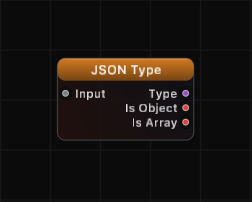
Detect the type of a JSON value. Reports the type as a string and provides boolean flags for the most common structural types.
Inputs
| Port | Type |
|---|---|
| InputThe value to identify. Anything can be connected — the result names it as object, array, string, number, boolean or null, and unconnected reads as null. | any |
Outputs
| Port | Type |
|---|---|
| Type | string |
| Is Object | bool |
| Is Array | bool |
Screenshots
Overview
JSON Type inspects any value and identifies its JSON type. The Type output is a string matching standard JSON type names: "object", "array", "string", "number", "boolean", or "null". Two convenience boolean outputs indicate whether the value is an object or an array, which are the most commonly checked types.
The node correctly distinguishes booleans from numbers (which is non-trivial in Swift, since both bridge to NSNumber). It uses Core Foundation type detection to ensure true/false are reported as "boolean" and not "number".
Examples
Object input:
Input: {"x": 1}
Type: "object", Is Object: true, Is Array: false
Array input:
Input: [1, 2, 3]
Type: "array", Is Object: false, Is Array: true
String input:
Input: "hello"
Type: "string", Is Object: false, Is Array: false
Number input:
Input: 42
Type: "number", Is Object: false, Is Array: false
Boolean input:
Input: true
Type: "boolean", Is Object: false, Is Array: false
Null input:
Input: (nothing connected)
Type: "null", Is Object: false, Is Array: false
Use Cases
- Validating data types before processing in downstream nodes
- Branching logic based on whether received data is an object or array
- Debugging data flow by inspecting types at various points in the graph
- Handling polymorphic data that may arrive as different types from external sources
Tips
- The Type output matches standard JSON type naming conventions, making it easy to compare with string values using a String Compare node.
- Is Object and Is Array are convenience outputs — they save you from needing a String Compare node for the two most common checks.
- Both OrderedJSON and plain dictionaries report as
"object". - Use this node before JSON Break to determine whether to expect named ports (object) or indexed ports (array).
A ready-made example project for this node is built into Grafit Pro: select the node in the library and open or drag the example from its description panel.
Open JSON Type in the interactive catalog →
JSON Type is one of 381 nodes in Grafit Pro.
Free download. Every feature for 7 days, no card. Then €99.99 once — or keep playing your projects as a Player.