JSON node
JSON Get
Retrieve a value from a JSON structure using a path expression. Returns the value, its type, and whether the path was found.
Inputs
| Port | Type | Default |
|---|---|---|
| InputThe data to read from. Objects, arrays and plain values all work; strings of JSON are read as they are. | json | — |
| PathWhere to look, in dot notation with bracket indices, like joints[0].name. Negative indices count from the end. Leave it empty to pass the whole input through; a path that does not exist returns nothing and Found goes false. | string | |
Outputs
| Port | Type |
|---|---|
| Value | any |
| Type | string |
| Found | bool |
Screenshots
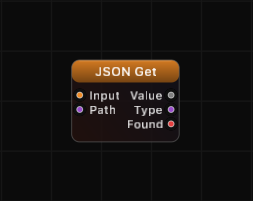
Overview
JSON Get provides direct path-based access into any JSON object or array. Specify a dot-notation path with optional bracket indices, and the node extracts the value at that location. The node outputs the resolved value, a string describing its type, and a boolean indicating whether the path exists.
If the path is empty, the entire input is returned as-is. If the path does not exist, Value defaults to 0, Type outputs "null", and Found outputs false.
Path Syntax
Paths use dot notation for object keys and bracket notation for array indices:
| Path | Meaning |
|---|---|
name | Top-level key name |
user.name | Key name inside object user |
items[0] | First element of array items |
items[2].label | Key label in the third element of array items |
data[-1] | Last element of array data (negative index wraps from end) |
a.b.c | Deeply nested key traversal |
| (empty) | Returns the entire input unchanged |
Examples
Get a top-level value:
Input: {"name": "circle", "radius": 1.5}, Path: radius
Value: 1.5, Type: "number", Found: true
Get a nested value:
Input: {"user": {"name": "Alice", "scores": [90, 85, 92]}}, Path: user.scores[1]
Value: 85, Type: "number", Found: true
Get the last array element:
Input: {"items": ["a", "b", "c"]}, Path: items[-1]
Value: "c", Type: "string", Found: true
Path not found:
Input: {"x": 1}, Path: y
Value: 0, Type: "null", Found: false
Empty path returns entire input:
Input: {"x": 1, "y": 2}, Path: (empty)
Value: {"x": 1, "y": 2}, Type: "object", Found: true
Use Cases
- Extracting specific fields from parsed API responses
- Reading named parameters from configuration objects
- Accessing array elements by computed index
- Drilling into nested data structures without multiple JSON Break nodes
Tips
- Use the Found output to conditionally branch logic when a path may or may not exist.
- The Type output is useful for validation — check that you received the expected data type before processing.
- For bulk extraction of all top-level keys, use JSON Break instead.
- Negative array indices wrap from the end:
[-1]is the last element,[-2]is second to last. - Chain multiple JSON Get nodes to extract several paths from the same structure — connect the same Input to all of them.
A ready-made example project for this node is built into Grafit Pro: select the node in the library and open or drag the example from its description panel.
Open JSON Get in the interactive catalog →
JSON Get is one of 381 nodes in Grafit Pro.
Free download. Every feature for 7 days, no card. Then €99.99 once — or keep playing your projects as a Player.