JSON node
JSON Has
Check whether a path exists within a JSON structure. Returns the existence status and the type of the value found at that path.
Inputs
| Port | Type | Default |
|---|---|---|
| InputThe data to test. Without anything connected the answer is always false. | json | — |
| PathThe location to check for, in dot notation with bracket indices, like face.eyes[1]. Negative indices count from the end. An empty path just reports the input itself as existing. | string | |
Outputs
| Port | Type |
|---|---|
| Exists | bool |
| Value Type | string |
Screenshots
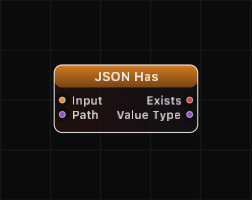
Overview
JSON Has is a lightweight existence check for JSON data. Given a JSON structure and a path, it reports whether the path resolves to a value. If found, the Value Type output describes the type of the value at that location. This node is useful for conditional logic — check before you access.
If the path is empty, the node checks whether the input itself exists (which is always true when something is connected) and reports its type.
Path Syntax
Paths use dot notation for object keys and bracket notation for array indices:
| Path | Meaning |
|---|---|
name | Top-level key name |
user.email | Key email inside object user |
items[0] | First element of array items |
items[2].label | Key label in the third element of array items |
data[-1] | Last element of array data (negative index wraps from end) |
| (empty) | Checks the input itself (always exists if connected) |
Examples
Key exists:
Input: {"name": "circle", "radius": 1.5}, Path: radius
Exists: true, Value Type: "number"
Key does not exist:
Input: {"name": "circle"}, Path: color
Exists: false, Value Type: "null"
Nested path exists:
Input: {"user": {"name": "Alice", "scores": [90, 85]}}, Path: user.scores[0]
Exists: true, Value Type: "number"
Nested path does not exist:
Input: {"user": {"name": "Alice"}}, Path: user.email
Exists: false, Value Type: "null"
Empty path checks input existence:
Input: {"x": 1}, Path: (empty)
Exists: true, Value Type: "object"
Use Cases
- Guarding against missing keys before accessing values with JSON Get
- Validating incoming data structures from external sources
- Conditional processing based on the presence of optional fields
- Checking array bounds by testing if an index exists before using JSON Array Get
Tips
- JSON Has is cheaper than JSON Get when you only need to know if something exists, not what the value is.
- The Value Type output provides a free type check alongside the existence check — useful for validation.
- Combine with a Logic node to build complex conditional checks (e.g., key exists AND is a certain type).
- Use the same path syntax as JSON Get and JSON Set for consistency across your graph.
A ready-made example project for this node is built into Grafit Pro: select the node in the library and open or drag the example from its description panel.
Open JSON Has in the interactive catalog →
JSON Has is one of 381 nodes in Grafit Pro.
Free download. Every feature for 7 days, no card. Then €99.99 once — or keep playing your projects as a Player.