JSON node
JSON Array Get
Retrieve a single element from a JSON array by its index. Supports negative indices to count from the end.
Inputs
| Port | Type | Default |
|---|---|---|
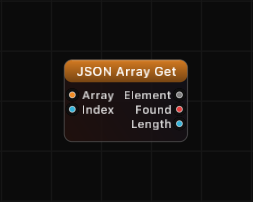
| ArrayThe array to read from — cable an orange JSON output that carries a list, such as JSON Array, JSON Parse or a Get that landed on a list. Objects and plain values give nothing back. | json | — |
| IndexWhich element to pull out, counting from 0. Negative values count back from the end, so -1 is the last element; anything past either edge returns nothing and Found goes false. | int | 0 |
Outputs
| Port | Type |
|---|---|
| Element | any |
| Found | bool |
| Length | int |
Screenshots
Overview
JSON Array Get provides index-based access to JSON arrays. Connect an array and specify the index, and the node returns the element at that position. The node also reports whether the element was found and the total length of the array.
Negative indices wrap from the end of the array, so -1 refers to the last element, -2 to the second-to-last, and so on. Out-of-range indices return a default value of 0 with Found set to false.
Examples
Get first element:
Array: ["apple", "banana", "cherry"], Index: 0
Element: "apple", Found: true, Length: 3
Get last element with negative index:
Array: [10, 20, 30, 40], Index: -1
Element: 40, Found: true, Length: 4
Out-of-range index:
Array: [1, 2, 3], Index: 5
Element: 0, Found: false, Length: 3
Get nested object from array:
Array: [{"name": "A"}, {"name": "B"}], Index: 1
Element: {"name": "B"}, Found: true, Length: 2
Use Cases
- Extracting a specific item from a data array by position
- Accessing the last element of a growing array with index -1
- Iterating through array elements using a Time or counter node to drive the Index
- Picking elements from arrays received via OSC, TCP, or serial input
Tips
- Use the Length output to know how many elements are available before accessing by index.
- The Found output lets you handle missing elements gracefully in downstream logic.
- For accessing values inside objects (key-based lookup), use JSON Get instead.
- Combine with a Math or Remap node to dynamically compute the Index at runtime.
- Float values connected to the Index port are automatically truncated to integers.
A ready-made example project for this node is built into Grafit Pro: select the node in the library and open or drag the example from its description panel.
Open JSON Array Get in the interactive catalog →
JSON Array Get is one of 381 nodes in Grafit Pro.
Free download. Every feature for 7 days, no card. Then €99.99 once — or keep playing your projects as a Player.