JSON node
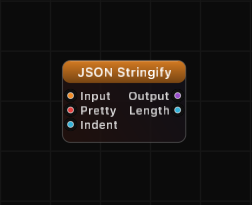
JSON Stringify
Convert structured JSON data into a formatted text string. Supports pretty-printing with configurable indentation.
Inputs
| Port | Type | Default |
|---|---|---|
| InputThe object, array or single value to turn into text. Key order is preserved as it arrived; unconnected gives empty text. | json | — |
| PrettyOn writes the text across multiple lines with indentation, off packs it onto one line — the compact form to send over TCP or OSC. | bool | true |
| IndentHow many spaces each nesting level is pushed in. Negative values count as 0, and 0 collapses the text to one line even when Pretty is on; 2 or 4 read best. | int | 4 |
Outputs
| Port | Type |
|---|---|
| Output | string |
| Length | int |
Screenshots
Overview
JSON Stringify is the inverse of JSON Parse. It takes any structured JSON value — objects, arrays, nested structures — and serializes it into a text string. The output can be compact (single line) or pretty-printed with customizable indentation.
The node respects OrderedJSON key ordering, so objects constructed with JSON Object maintain their key sequence in the output text. Plain dictionaries use sorted key order.
Examples
Pretty-print an object:
Input: {"name": "circle", "radius": 1.5}, Pretty: true, Indent: 4
Output:
{
    "name": "circle",
    "radius": 1.5
}
Compact output:
Input: {"x": 1, "y": 2}, Pretty: true, Indent: 0
Output: {"x":1,"y":2}
Pretty-print disabled:
Input: {"a": [1, 2, 3]}, Pretty: false
Output: {"a":[1,2,3]}
Two-space indent:
Input: {"colors": ["red", "green"]}, Pretty: true, Indent: 2
Output:
{
  "colors": [
    "red",
    "green"
  ]
}
Use Cases
- Formatting JSON data for display in a Text As Image node on the output canvas
- Preparing JSON payloads for transmission via TCP Client or OSC Sender
- Debugging data flow by visualizing structured data as readable text
- Exporting structured data to external systems or files
Tips
- The Length output is useful for monitoring payload size before network transmission.
- Key order is preserved from OrderedJSON sources (JSON Object, JSON Merge). This gives you predictable, reproducible output.
- Set Indent to 2 for compact-but-readable output, or 4 for standard formatting.
- Special characters in strings (quotes, backslashes, newlines, tabs) are automatically escaped.
- Booleans serialize as
true/falseand null values serialize asnull, matching standard JSON conventions.
A ready-made example project for this node is built into Grafit Pro: select the node in the library and open or drag the example from its description panel.
Open JSON Stringify in the interactive catalog →
JSON Stringify is one of 381 nodes in Grafit Pro.
Free download. Every feature for 7 days, no card. Then €99.99 once — or keep playing your projects as a Player.