JSON node
JSON Set
Set a value at a specific path within a JSON structure. The operation is immutable -- it returns a new structure with the modification applied, leaving the original unchanged.
Inputs
| Port | Type | Default |
|---|---|---|
| InputThe object or array to write into. Nothing is modified in place — the changed copy leaves through Output. | json | — |
| PathWhere to write, in dot notation with bracket indices, like joints[0].rotation[1]. Missing steps are created along the way; an empty path writes nothing and Success stays off. | string | |
| ValueWhat to store at that path. Any type is accepted — number, text, switch, another object or array. Leaving it unconnected stores null. | any | — |
Outputs
| Port | Type |
|---|---|
| Output | json |
| Success | bool |
Screenshots
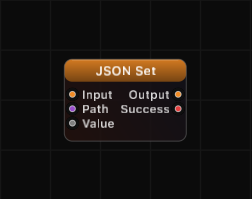
Overview
JSON Set inserts or replaces a value at any depth inside a JSON object or array. Provide the target structure on the Input port, specify the path using dot notation and bracket syntax, and connect the value to write. The node outputs the modified structure along with a success flag.
If the path points to a location that does not yet exist, intermediate objects and arrays are created automatically. If the path is empty or the input is missing, the original structure passes through unchanged and Success outputs false.
Path Syntax
Paths use dot notation for object keys and bracket notation for array indices:
| Path | Meaning |
|---|---|
name | Top-level key name |
user.name | Key name inside object user |
items[0] | First element of array items |
items[2].label | Key label in third element of array items |
data[-1] | Last element of array data (negative index) |
a.b.c | Deeply nested key access |
Intermediate structures are auto-created:
- If the next component is a key, an empty object
{}is created. - If the next component is an index, an empty array
[]is created (padded withnullup to the target index).
Examples
Set a simple key:
Input: {"x": 0}, Path: y, Value: 5
Output: {"x": 0, "y": 5}, Success: true
Set a nested value:
Input: {"user": {"name": "Alice"}}, Path: user.age, Value: 30
Output: {"user": {"name": "Alice", "age": 30}}, Success: true
Set an array element:
Input: {"colors": ["red", "green", "blue"]}, Path: colors[1], Value: "yellow"
Output: {"colors": ["red", "yellow", "blue"]}, Success: true
Auto-create intermediate structure:
Input: {}, Path: users[0].name, Value: "Bob"
Output: {"users": [{"name": "Bob"}]}, Success: true
Use Cases
- Dynamically updating values in configuration objects
- Inserting computed results into data structures before export
- Building complex nested JSON incrementally through a chain of JSON Set nodes
- Modifying array elements based on runtime index values
Tips
- Chain multiple JSON Set nodes to modify several paths in sequence.
- Check the Success output to detect when a path operation fails.
- The original input is never modified — JSON Set always produces a new copy. This is safe for branching pipelines.
- Use negative indices like
[-1]to target the last element of an array. - Empty Path results in the original input passing through unchanged.
A ready-made example project for this node is built into Grafit Pro: select the node in the library and open or drag the example from its description panel.
Open JSON Set in the interactive catalog →
JSON Set is one of 381 nodes in Grafit Pro.
Free download. Every feature for 7 days, no card. Then €99.99 once — or keep playing your projects as a Player.