String node
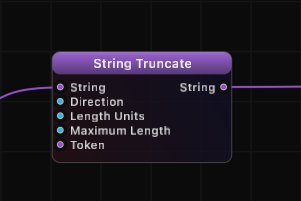
String Truncate
Shorten a string to a maximum length, with control over which part is removed and what units are used. Supports truncation from the start, middle, or end, measured in characters, words, or sentences, with a customizable truncation token.
Inputs
| Port | Type | Default |
|---|---|---|
| StringThe text to shorten. Anything already at or under the limit passes through untouched, and empty text stays empty. | string | — |
| DirectionWhich part of the text survives: From the Start keeps the opening, From the End keeps the ending, From the Middle keeps both ends. Values outside the list fall back to From the Start. | int | 0 |
| Length UnitsWhat the limit counts — characters, words, or whole sentences. Values outside the list fall back to characters. | int | 0 |
| Maximum LengthHow much text to keep, measured in the chosen unit. Not clamped, but 0 or less returns empty text; From the Middle splits the budget across both ends. | int | 10 |
| TokenThe marker placed where text was cut away, such as three dots or an arrow. Any text works; leave it empty for a silent cut. | string | ... |
Outputs
| Port | Type |
|---|---|
| StringThe text to shorten. Anything already at or under the limit passes through untouched, and empty text stays empty. | string |
Screenshots
Direction Modes
| Mode | Value | Behavior | Example (max 5 chars) |
|---|---|---|---|
| From Start | 0 | Keeps the beginning, removes the end | "Hello World" -> "Hello..." |
| From End | 1 | Keeps the end, removes the beginning | "Hello World" -> "...World" |
| From Middle | 2 | Keeps both ends, removes the center | "Hello World" -> "He...ld" |
Length Unit Modes
| Mode | Value | Counts By | Example Input | Max 3 | Result |
|---|---|---|---|---|---|
| Characters | 0 | Individual characters | "Hello World" | 3 | "Hel..." |
| Words | 1 | Whitespace-separated words | "one two three four" | 3 | "one two three..." |
| Sentences | 2 | Sentence boundaries | "First. Second. Third. Fourth." | 3 | "First. Second. Third...." |
How It Works
String Truncate checks whether the input string exceeds the Maximum Length when measured in the specified Length Units. If it does, the string is shortened to fit and the Token is inserted at the truncation point. If the input is already within the limit, it passes through unchanged.
The Direction setting controls which portion of the string is preserved. From Start keeps the leading content, From End keeps the trailing content, and From Middle preserves both ends while removing the center.
The Token (default "...") is only inserted when actual truncation occurs. It replaces the removed portion, giving readers a visual cue that content has been cut.
Use Cases
- Display text previews by truncating long descriptions to a fixed character count.
- Create summary labels by limiting output to a maximum number of words.
- Format ticker text by keeping the beginning of news headlines with an ellipsis.
- Shorten file paths by truncating from the middle to show both the root and the filename.
- Sentence-level summarization by keeping only the first N sentences of a paragraph.
Tips
- Set Token to an empty string if you want clean truncation with no indicator.
- From Middle truncation is particularly useful for file paths or URLs where both the beginning and end carry important information.
- Word and sentence modes respect natural language boundaries, producing cleaner results than raw character truncation.
- The Maximum Length counts the content units only; the token is added in addition to the kept content.
A ready-made example project for this node is built into Grafit Pro: select the node in the library and open or drag the example from its description panel.
Open String Truncate in the interactive catalog →
String Truncate is one of 381 nodes in Grafit Pro.
Free download. Every feature for 7 days, no card. Then €99.99 once — or keep playing your projects as a Player.