String node
String Splitter
Split a string into an array of substrings using a delimiter. Supports standard escape sequences and character-by-character splitting. Outputs the parts as an indexed structure ready for downstream processing.
Inputs
| Port | Type | Default |
|---|---|---|
| StringThe text to cut into pieces. Empty text yields no parts and a count of 0. | string | — |
| DelimiterThe separator to cut on, a comma by default. Leave it empty to split into single characters; typed escapes for tab, newline and carriage return are understood as the real characters. | string | , |
Outputs
| Port | Type |
|---|---|
| Parts | structure |
| Count | int |
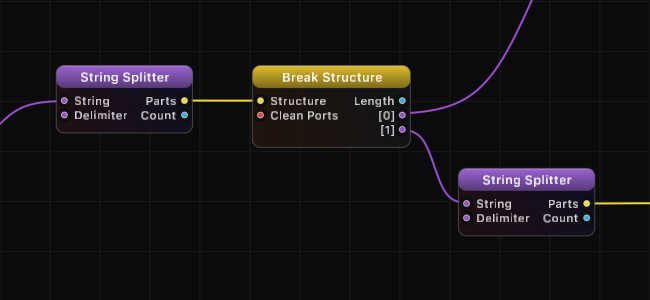
Screenshots
How It Works
String Splitter divides the input string at every occurrence of the delimiter and outputs the resulting substrings as an indexed structure. The delimiter itself is not included in any of the output parts.
The node recognizes standard escape sequences in the Delimiter input:
| Escape Sequence | Meaning |
|---|---|
\t | Tab character |
\n | Newline (line feed) |
\r | Carriage return |
When the Delimiter is set to an empty string, the node splits the input into individual characters. Each character becomes a separate element in the output structure.
If the delimiter is not found in the input string, the Parts output contains a single element (the entire original string) and Count returns 1.
Examples
| Input String | Delimiter | Parts | Count |
|---|---|---|---|
| "a,b,c" | , | ["a", "b", "c"] | 3 |
| "hello world" | (space) | ["hello", "world"] | 2 |
| "line1\nline2" | \n | ["line1", "line2"] | 2 |
| "abc" | (empty) | ["a", "b", "c"] | 3 |
| "no match" | ; | ["no match"] | 1 |
Use Cases
- Parse CSV data by splitting on commas to extract individual fields.
- Break lines by splitting on newline characters for line-by-line processing.
- Tokenize text by splitting on spaces or tabs for word-level analysis.
- Decompose paths by splitting on "/" or "." to extract path components.
- Character-level processing by using an empty delimiter to access individual characters.
Tips
- Use the Index node on the Parts output to grab a specific substring by position.
- Chain with String Combine to reassemble parts with a different delimiter (effectively a find-and-replace for delimiters).
- The Count output is useful for validation, such as checking that a CSV line has the expected number of fields.
- For more advanced pattern matching and splitting, consider using String Compare in Regex mode.
A ready-made example project for this node is built into Grafit Pro: select the node in the library and open or drag the example from its description panel.
Open String Splitter in the interactive catalog →
String Splitter is one of 381 nodes in Grafit Pro.
Free download. Every feature for 7 days, no card. Then €99.99 once — or keep playing your projects as a Player.