String node
String Replace
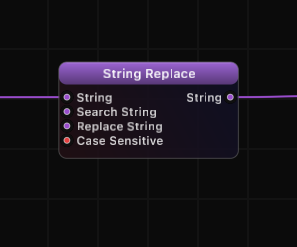
Replace all occurrences of a search string with a replacement string. Supports both case-sensitive and case-insensitive matching for flexible text transformation.
Inputs
| Port | Type | Default |
|---|---|---|
| StringThe text to work on. It passes through untouched if it is empty. | string | — |
| Search StringThe piece of text to find. Every occurrence is replaced, not just the first; an empty search leaves the text unchanged. | string | — |
| Replace StringWhat each found occurrence becomes. Leave it empty to delete the matches instead of swapping them. | string | — |
| Case SensitiveOn, only exact-case occurrences are replaced. Off, matches are found regardless of case. | bool | true |
Outputs
| Port | Type |
|---|---|
| StringThe text to work on. It passes through untouched if it is empty. | string |
Screenshots
How It Works
String Replace scans the input string for every occurrence of the Search String and substitutes each one with the Replace String. All matches are replaced in a single pass.
When Case Sensitive is enabled (default), the match must be exact: "World" will not match "world" or "WORLD". When disabled, the search ignores letter casing, matching regardless of upper or lower case.
If the Search String is empty or not found in the input, the original string passes through unchanged. The Replace String can also be empty, which effectively deletes all occurrences of the search term.
Examples
| Input | Search | Replace | Case Sensitive | Output |
|---|---|---|---|---|
| "Hello World" | "World" | "Grafit" | true | "Hello Grafit" |
| "aaa bbb aaa" | "aaa" | "ccc" | true | "ccc bbb ccc" |
| "Hello HELLO" | "hello" | "Hi" | false | "Hi Hi" |
| "remove-dashes" | "-" | "" | true | "removedashes" |
| "no match here" | "xyz" | "abc" | true | "no match here" |
Use Cases
- Clean data by removing unwanted characters or substrings from serial or network input.
- Format strings by replacing placeholders with dynamic values.
- Normalize text by converting specific patterns to a standard format.
- Strip characters by replacing them with an empty string.
- Correct casing issues by using case-insensitive mode to catch all variations.
Tips
- Set the Replace String to empty to delete all occurrences of the Search String.
- Use case-insensitive mode when processing user input or data from external sources where casing may vary.
- For pattern-based replacement (regex), use String Compare in Regex mode to identify matches, then build the replacement logic with additional nodes.
- Chain multiple String Replace nodes to perform several different substitutions in sequence.
A ready-made example project for this node is built into Grafit Pro: select the node in the library and open or drag the example from its description panel.
Open String Replace in the interactive catalog →
String Replace is one of 381 nodes in Grafit Pro.
Free download. Every feature for 7 days, no card. Then €99.99 once — or keep playing your projects as a Player.