String node
String Case
Convert the letter casing of a string. Choose from three modes: capitalize each word, convert to all uppercase, or convert to all lowercase.
Inputs
| Port | Type | Default |
|---|---|---|
| StringThe text to re-case. Empty input gives empty output; any length works. | string | — |
| ModeWhich casing to apply — Capitalized starts every word with a capital, Uppercase and Lowercase convert every letter. Values outside the list fall back to Capitalized. | int | 0 |
Outputs
| Port | Type |
|---|---|
| StringThe text to re-case. Empty input gives empty output; any length works. | string |
Screenshots
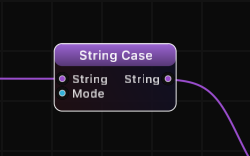
Modes
| Mode | Value | Description | Example Input | Example Output |
|---|---|---|---|---|
| Capitalized | 0 | Capitalizes the first letter of each word, lowercases the rest | "hello world" | "Hello World" |
| Uppercase | 1 | Converts all letters to uppercase | "hello world" | "HELLO WORLD" |
| Lowercase | 2 | Converts all letters to lowercase | "Hello World" | "hello world" |
How It Works
String Case applies a letter-casing transformation to the entire input string based on the selected mode.
In Capitalized mode, each word boundary is detected and the first letter of every word is converted to uppercase while remaining letters are lowercased. This is sometimes called "title case."
In Uppercase and Lowercase modes, every letter in the string is uniformly converted. Non-letter characters (digits, punctuation, spaces) are unaffected in all modes.
The transformation respects Unicode, so accented characters and letters from non-Latin scripts are handled correctly.
Examples
| Input | Mode | Output |
|---|---|---|
| "hello world" | Capitalized | "Hello World" |
| "hello world" | Uppercase | "HELLO WORLD" |
| "HELLO WORLD" | Lowercase | "hello world" |
| "jOhN dOe" | Capitalized | "John Doe" |
| "already OK" | Uppercase | "ALREADY OK" |
| "Price: $9.99" | Lowercase | "price: $9.99" |
Use Cases
- Format display text with proper title casing for headings or labels rendered by the Text node.
- Normalize user input to a consistent case before comparison or processing.
- Prepare data for case-insensitive matching by converting to lowercase before using String Compare in case-sensitive mode.
- Style text output for serial, OSC, or TCP communication protocols that expect specific casing.
Tips
- Capitalized mode is useful for formatting names or titles where each word should start with an uppercase letter.
- For case-insensitive string comparison, you can either use this node to normalize both strings first, or use the Case Sensitive toggle on the String Compare node directly.
- Non-letter characters (numbers, symbols, punctuation) pass through unchanged in all modes.
- Chain with String Replace or String Combine for more complex text formatting pipelines.
A ready-made example project for this node is built into Grafit Pro: select the node in the library and open or drag the example from its description panel.
Open String Case in the interactive catalog →
String Case is one of 381 nodes in Grafit Pro.
Free download. Every feature for 7 days, no card. Then €99.99 once — or keep playing your projects as a Player.