String node
String Compare
Compare two strings using one of five modes: exact match, contains, starts with, ends with, or regular expression. Reports whether a match was found, the position of the first match, and the total number of matches.
Inputs
| Port | Type | Default |
|---|---|---|
| String AThe text being searched or tested. Empty text simply never matches, except against an empty pattern. | string | — |
| String BWhat to look for in String A — the exact text, the substring, the prefix, the suffix, or the pattern, depending on Mode. | string | — |
| ModeHow the two texts are compared: Equals, Contains, Starts With, Ends With or Regex. Values outside the list fall back to Equals; a malformed pattern in Regex just reports no match. | int | 0 |
| Case SensitiveOn, upper and lower case must match exactly. Off, letters match regardless of case, in every mode including Regex. | bool | true |
Outputs
| Port | Type |
|---|---|
| Result | bool |
| Index | int |
| Match Count | int |
Screenshots
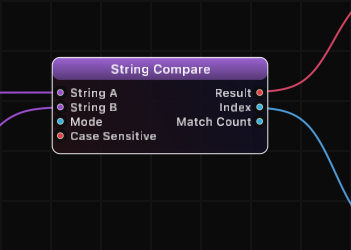
Comparison Modes
| Mode | Value | Description | Example A | Example B | Result |
|---|---|---|---|---|---|
| Equals | 0 | Strings must be identical | "Hello" | "Hello" | true |
| Contains | 1 | String A contains String B anywhere | "Hello World" | "lo Wo" | true |
| Starts With | 2 | String A begins with String B | "Hello World" | "Hello" | true |
| Ends With | 3 | String A ends with String B | "Hello World" | "World" | true |
| Regex | 4 | String B is a regular expression pattern | "abc123" | "[0-9]+" | true |
How It Works
String Compare tests String A against String B using the selected comparison mode. The Result output indicates whether the comparison succeeded. The Index output reports the character position where the first match begins (zero-based), or -1 if there is no match.
In Contains mode, the Match Count output reports how many non-overlapping occurrences of String B exist within String A. In Regex mode, Match Count reports how many matches the pattern produces. For Equals, Starts With, and Ends With modes, Match Count is either 0 or 1.
The Case Sensitive toggle applies to all modes including Regex (when disabled, the regex is executed with case-insensitive flag).
Regex Mode
In Regex mode, String B is interpreted as a regular expression pattern. Standard regex syntax is supported, including character classes, quantifiers, anchors, and groups. Invalid regex patterns will produce no match (Result = false, Index = -1).
Examples
| String A | String B | Mode | Case Sensitive | Result | Index | Match Count |
|---|---|---|---|---|---|---|
| "Grafit" | "Grafit" | Equals | true | true | 0 | 1 |
| "Grafit" | "grafit" | Equals | true | false | -1 | 0 |
| "Grafit" | "grafit" | Equals | false | true | 0 | 1 |
| "Hello World" | "World" | Contains | true | true | 6 | 1 |
| "aaa" | "a" | Contains | true | true | 0 | 3 |
| "data.csv" | "data" | Starts With | true | true | 0 | 1 |
| "image.png" | ".png" | Ends With | true | true | 5 | 1 |
| "abc 123 def" | "\\d+" | Regex | true | true | 4 | 1 |
Use Cases
- Validate input format using regex to check that strings match expected patterns.
- Filter data streams by checking whether incoming strings contain a specific keyword.
- Route by prefix using Starts With mode to branch processing based on message types.
- File type detection using Ends With mode to check file extensions.
- Count occurrences of a substring within a larger body of text.
- Pattern extraction using regex to detect structured data like numbers, dates, or identifiers.
Tips
- The Index output is useful for downstream String Part operations when you need to extract content at or around the match position.
- In Regex mode, escape special characters with a backslash if you want to match them literally (e.g., "\\." to match a period).
- Use case-insensitive mode when processing user-generated or external data where casing is unreliable.
- The Match Count in Contains mode counts non-overlapping matches from left to right.
- Chain the Result output into a Logic node or conditional to build branching workflows.
A ready-made example project for this node is built into Grafit Pro: select the node in the library and open or drag the example from its description panel.
Open String Compare in the interactive catalog →
String Compare is one of 381 nodes in Grafit Pro.
Free download. Every feature for 7 days, no card. Then €99.99 once — or keep playing your projects as a Player.