Input node
Mouse
Provides real-time mouse position and button states from the Output Render window. All position data is reported in Grafit coordinate space, where the center of the viewport is (0, 0).
Inputs
| Port | Type | Default |
|---|---|---|
| Reset ScrollWhile true, the accumulated scroll amount is wiped back to zero. Pulse it from a trigger to re-centre a scroll-driven parameter. | bool | false |
| Scroll FactorMultiplies the scroll outputs, so a wheel notch can mean a lot or a little. Not clamped; negative values invert the scroll direction. | float | 1.0 |
Outputs
| Port | Type |
|---|---|
| X | float |
| Y | float |
| Left Click | bool |
| Right Click | bool |
| Middle Click | bool |
| Scroll X | float |
| Scroll Y | float |
Screenshots
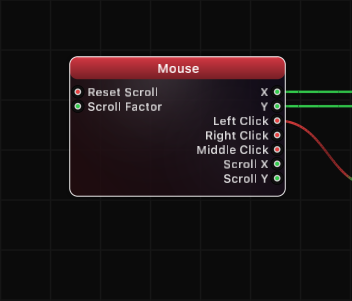
How It Works
The Mouse node tracks cursor activity within the Output Render window. Position is reported in Grafit coordinate space, where the center of the viewport maps to (0, 0) and the shorter viewport dimension spans from -1 to +1. This means position values are resolution-independent and consistent across different window sizes.
Scroll values accumulate over time rather than reporting instantaneous deltas. The Scroll Factor input scales incoming scroll events before they are added to the running total. Toggling Reset Scroll to true clears both Scroll X and Scroll Y back to zero.
Position updates occur at the display refresh rate, ensuring smooth tracking for interactive visuals and cursor-driven animations.
Use Cases
- Driving particle emitter positions with cursor movement
- Creating interactive visuals that respond to mouse clicks
- Implementing scroll-controlled zoom or parameter adjustment
- Building UI-like interactions within the output viewport
- Mapping mouse position to shader uniforms for real-time effects
Tips
- Position values extend beyond -1/+1 on the longer viewport axis (e.g., X ranges from -aspectRatio to +aspectRatio in landscape mode)
- Use Scroll Factor to fine-tune how sensitive scroll input feels for your use case
- Combine with a Compare or Logic node to trigger events on click edges
- The node only tracks the mouse inside the Output Render window; moving the cursor outside produces no updates
A ready-made example project for this node is built into Grafit Pro: select the node in the library and open or drag the example from its description panel.
Open Mouse in the interactive catalog →
Mouse is one of 381 nodes in Grafit Pro.
Free download. Every feature for 7 days, no card. Then €99.99 once — or keep playing your projects as a Player.